Как это работает?
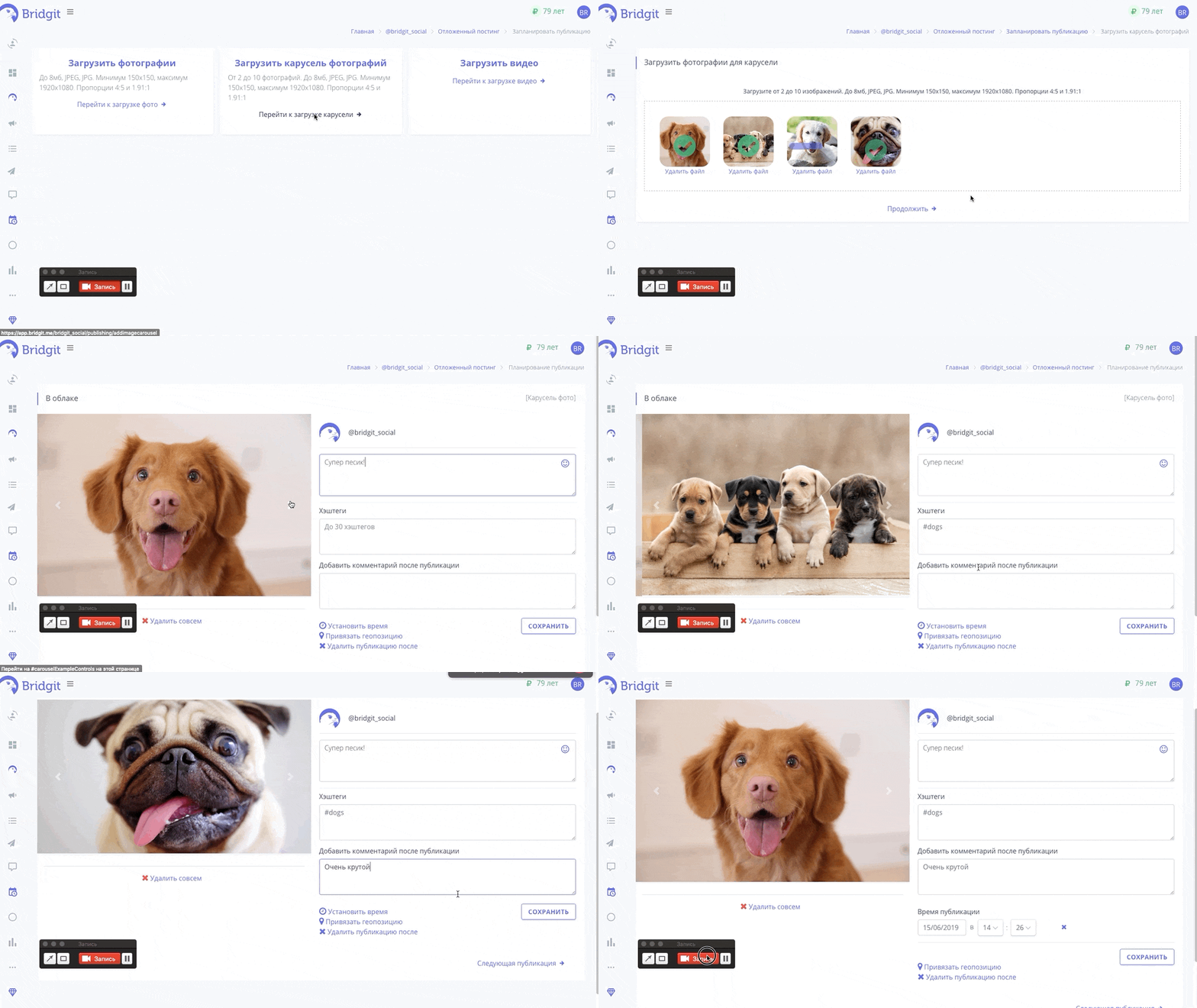
- В личном кабинете перейдите на страницу Отложенный постинг/Запланировать репост;
- После чего выберите Загрузить карусель фотографий или Перейти к загрузке карусели;
- В открывшийся странице появится форма закгрузки фотографий, достаточно перетащить в эту форму фотографии или кликнуть на нее;
- После того, как фотографии загружены, нажмите Продолжить;
- Откроется окно в котором вы сможете: добавить описание к фотографиям, указать до 30 хештегов, уставновить время публикации, привязать геопозицию, добавить комментарий после публикации;
- После того, как вы сохраните свои изменения и если вы указали время публикации, фотография будет опубликована.
Попробуем? Первые 24 часа бесплатно!
Получите первых подписчиков уже через несколько минут
* деятельность компании Meta Platforms Inc., которой принадлежит Инстаграм, запрещена на территории РФ.
Соцсеть признана экстремистской и запрещена в России.