
Содержание
Ссылка на страницу в Instagram – уникальный веб-адрес, который направит на страницу Вашего или другого пользователя. Разместив её на других площадках в интернете, есть возможность повысить охват аккаунта. Это отличный инструмент рекламы, способствующий увеличению охвата публикаций и привлечению новых подписчиков. В этой статье мы поговорим о том, как копировать ссылку в Instagram.
Копирование ссылки на свою страницу Инстаграм с приложения
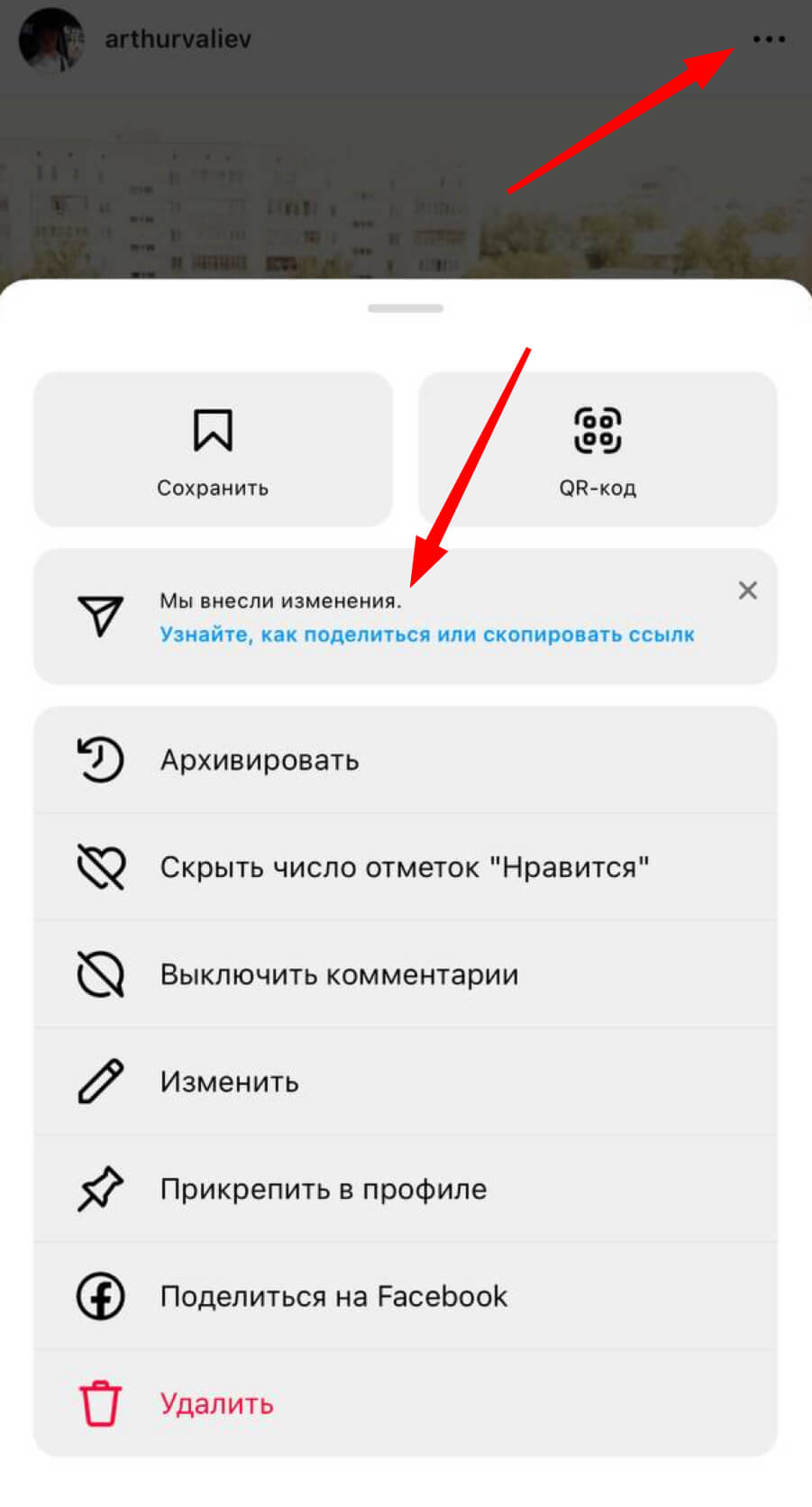
Есть несколько способов того, как получить ссылку на Инсту. Выбор зависит от типа устройства, которое Вы используете, чтобы зайти в соцсеть. Instagram – мобильная сеть, в которую обычно пользователи заходят, используя мобильный телефон. Для этого скачайте и запустить приложение. В официальной версии Инсты нельзя копировать ссылку на свою страницу. Чтобы решить эту проблему, не потребуются особые усилия. Можете копировать веб-ссылку на пост, открыв который, Вы быстро сможете перейти на профиль человека. Чтобы это сделать, следуйте инструкции:
- Откройте приложение, выберете любую публикацию, которая выложена на странице.
- Кликните на значок меню, расположенный в верхнем правом углу.
- Тапните на опцию «Поделиться» с изображением самолетика.
Далее Вы можете отправить её кому-то в Direct Инстаграма или в другие соцсети/мессенджеры. При использовании телефона, для этого в списке кликните на «Скопировать». Если остановите выбор на последнем варианте, после тапа ссылка попадёт в буфер обмена телефона или другого устройства.
Другим, не менее популярным методом копирования ссылки Инстаграма, является использование другого аккаунта. Чтобы воспользоваться этим способом, необходимо авторизоваться в приложении под другим именем. Затем необходимо найти в поиске аккаунт, ссылку на который требуется получить. Открыв профиль, тапните на дополнительное меню. Оно находится справа вверху (три точки). Из открывшегося следует выбрать пункт копирования URL-профиля.
Копирование ссылки на свою страницу Инстаграм с компьютера
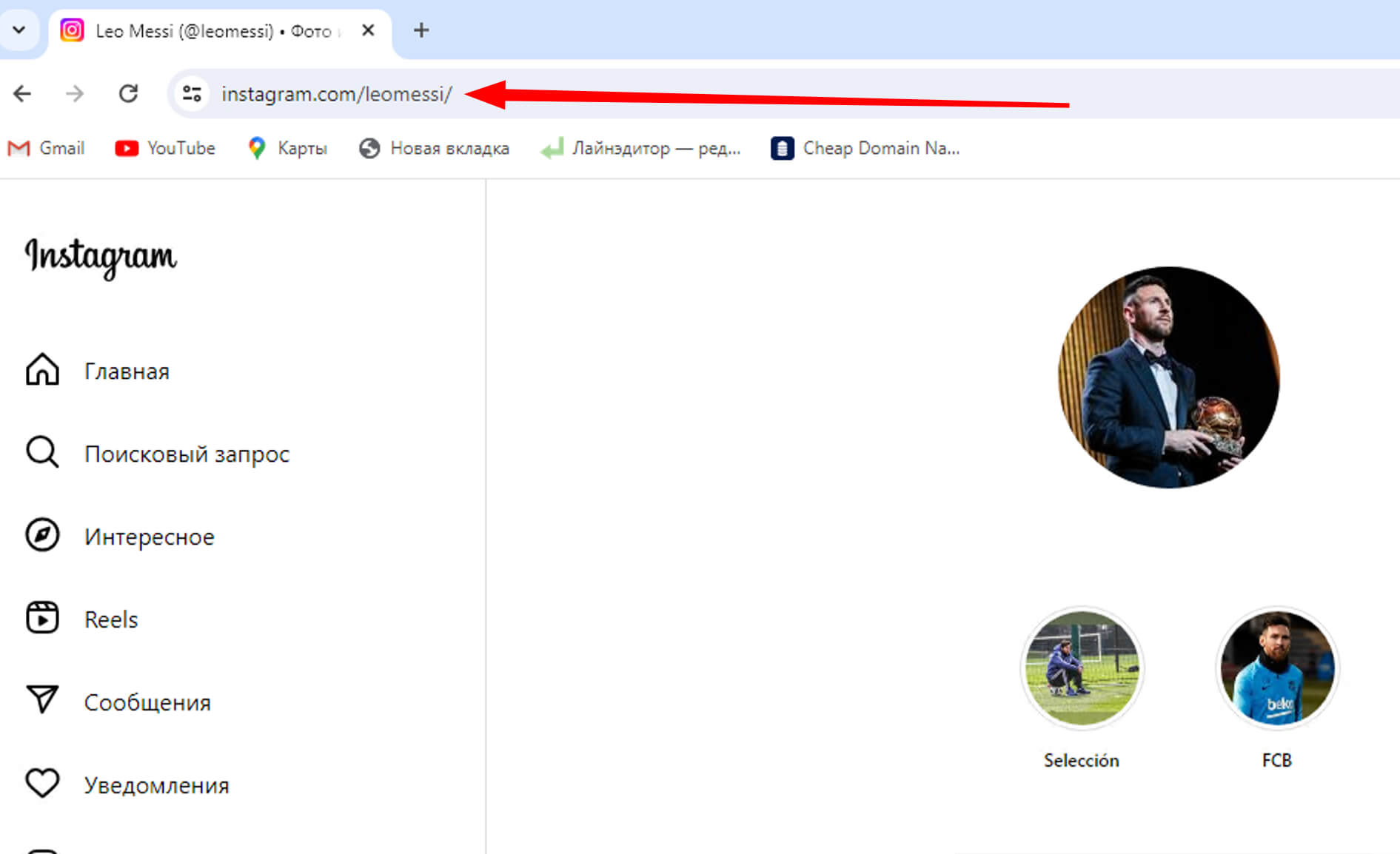
Когда необходимо получить URL-ссылку, лучше использовать веб-версию приложения. Всё довольно просто. Сначала зайдите на официальный сайт соцсеты, используя браузер. После авторизации, в строке будут отображена ссылка на Вашу страницу. Её Вам и нужно будет скопировать. Чтобы сделать это, следуйте простой инструкции:
- Выделите ссылку посредством левой клавиши компьютерной мышки;
- Правой клавишей откройте меню «Дополнение»;
- Из открывшегося списка выберете пункт «Копировать».
Упростить данный этап можно, использую комбинацию клавиш Ctrc+C. Далее Вы отправляете ссылку в Директе, в других соцсетях или сохраняете в документе на компьютере.
Поскольку Instagram – очень «живая» социальная сеть, лучше рассмотреть и другие варианты копирование ссылки. Помните о том, что интерфейс приложения регулярно обновляются, некоторые функции разработчики убирают. Если вышеперечисленные способы не помогут добиться требуемого результата, воспользуйтесь теми, что представлены ниже:
- Зайдите в поисковую систему. В поиске введите Instagram и свой ник. Гугл или Яндекс выдадут ссылку на Ваш профиль среди первых в результатах поиска.
- Введите адрес вручную, так как в этом нет ничего сложного. Вы можете без труда выучить ссылку на свою страницу в Инсте. Для этого необходимо ввести www.instagram.com/, добавив в конце ник без @.
- Через дату публикации. Если увеличить фотографию или видео в публикации, справа появится информация о том, когда был сделан пост. Если нажать на дату правой кнопкой мышки, будет предоставлено несколько действий. Выберите пункт «Копировать адрес ссылки», после чего она окажется в буфере обмена. Далее вам следует перейти туда, куда Вы хотите отправить URL или разместить её. Вставить можно двумя способами. В первом случае нажимаем на правую кнопку компьютерной мышки и выбираем пункт «Вставить». Во-втором используйте «горячие клавиши» Ctrl+V.
Самый удобный вариант – один раз потратить время на поиск ссылки, а затем сохранить его в заметках. В следующий раз, когда он понадобится, Вам не нужно будет тратить время на поиски.
Как скопировать ссылку чужого профиля Instagram?
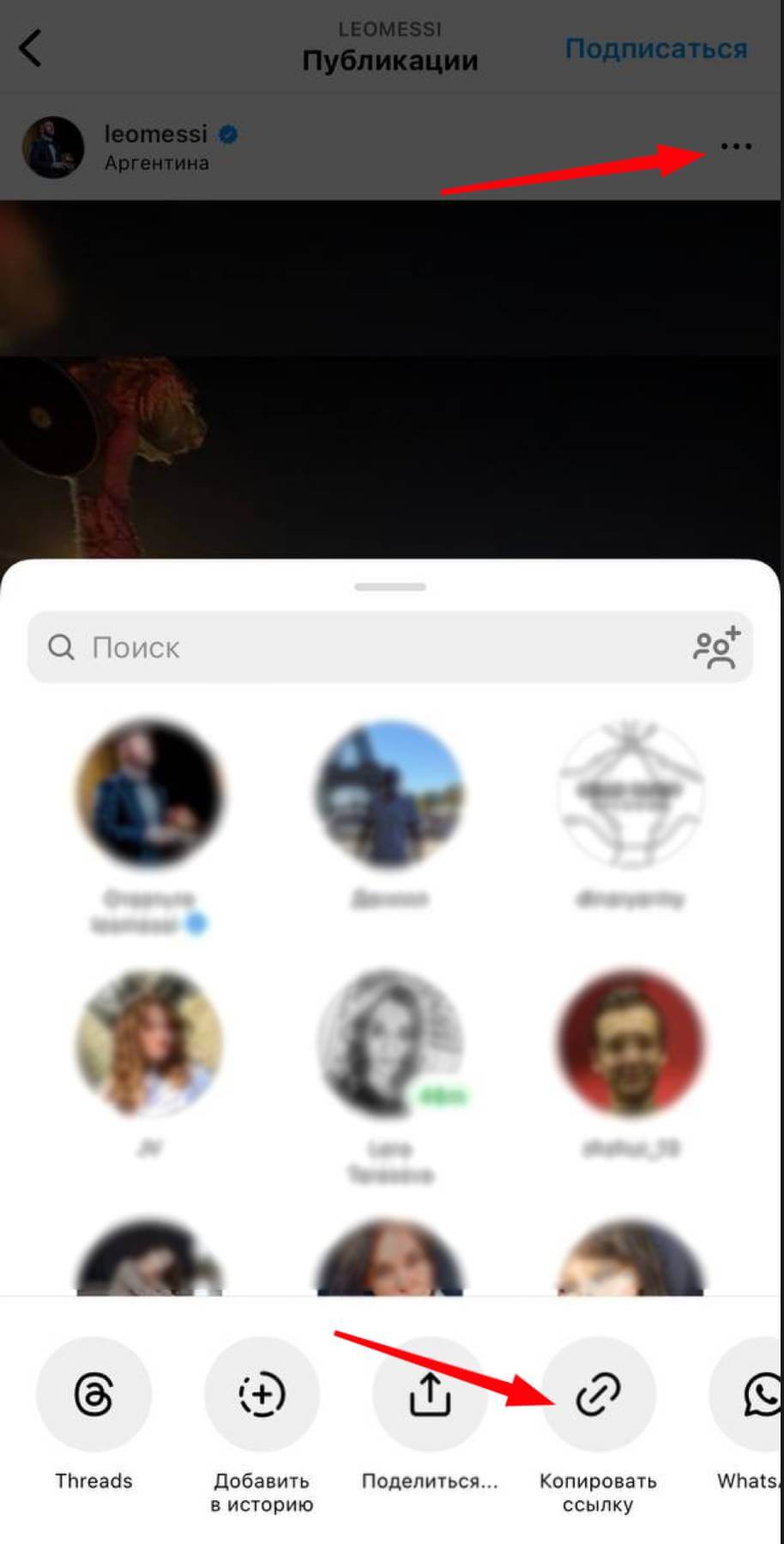
Иногда может потребоваться поделиться ссылкой на страницу чужого человека в Инстаграм. В этом случае используются аналогичные способы, как и при копировании своей. Единственное, в мобильной версии для этого разработчиками была создана специальная опция. Чтобы воспользоваться ей, требуется выполнить следующие действия:
- Запускаем приложение с мобильного или другого устройства на Андройде или iOS, авторизируемся, введя логин и пароль.
- Найдите через поисковик или иным методом страницу того пользователя, ссылку которого вы хотите копировать.
- Перейдите в профиль другого человека.
- Нажмите на 3 точки, расположенные в верхнем углу.
- Из предложенного списка действий выберете пункт копирования URL аккаунта.
Если Вы точно знаете то, как пишется никнейм человека, можно написать адрес на его страницу вручную. Как это сделать, уже было описано выше.
При использовании компьютера процесс ещё проще. Найдите нужный профиль. Это можно сделать из своего аккаунта в Инстаграме или через поисковую систему. Важно будет только зайти на страницу чужого человека и скопировать веб-ссылку в адресной строке.
Заметьте, что не следует копировать ссылку из браузера, если Вы не планируете делиться ею за пределами приложения Instagram. Для этого необходимо действовать следующим образом:
- Нажмите на точки в правом верхнем углу.
- Выберете пункт «Поделиться профилем».
- В списке, который появится после нажатия, отметьте одного пользователя или несколько человек для отправки им.
Как отправить ссылку в Директе?
В том, чтобы поделиться сторонним профилем в Директе, нет ничего сложного. Представляем пошаговую инструкцию:
- Переходите в требуемый аккаунт.
- Откройте меню «Подробнее», нажав на три точки, расположенные в правом верхнем углу).
- Тапните на пункт «Отправить профиль как сообщение».
- Выберете из списка пользователя, с которым хотите поделиться ссылкой на страницу.
Используя вышеперечисленную информацию, Вы сможете заниматься рассылкой линка. Это своеобразная реклама, которая поможет повысить популярность аккаунта в Инстаграме. Чтобы выполнить рассылку, действуйте следующим образом:
- Выделите гиперссылку и тапните на пункт «Копировать», следуя рекомендациям, представленным выше.
- Заходите в приложение, к примеру, в интернет-ресурс либо мессенджер. Вставьте скопированную ссылку в личное сообщение, отзыв либо комментарий.
Используя этот метод, Вы сделаете профиль в Instagram более популярным. Это эффективный способ раскрутки, позволяющий привлечь подписчиков.
Итоги
Instagram – популярная социальная сеть, разработчики которой прикладывают усилия для предотвращения использования недобросовестных методов рекламы и накрутки подписчиков. На сегодняшний день, это огромная рекламная площадка, в которой зарегистрировано более миллиарда пользователей. Рекламу можно увидеть в публикациях, в сторис, у популярных блоггеров, у звёзд шоу-бизнеса и т.д. Компания преследует цель защищать авторские права и показывать только законную рекламу.
Для предотвращения недобросовестной рекламы, в Инстаграме ограничена возможность копировать ссылку на свой профиль в приложении. Нельзя беспрепятственно сохранить пост или комментарий, чтобы поделиться им. Для этого рекомендуем использовать специальные способы, которые представлены выше.
Ссылка на профиль в соцсети Instagram – отличный метод привлечения новых фолловеров на страницу. Например, Вы можете в своём блоге на других платформах, например на YouTube или в Твиттере, рассказать о том, чем делитесь в Инсте, чем он будет полезен, при этом, прикрепив URL-адрес. Также, ссылка может потребоваться и для рассылки писем. Всё это можно сделать быстро и бесплатно, если знать нюансы. Помните, что можно копировать не только ссылку, но и фотографии с видео. Нужно выбрать понравившуюся публикацию, открыть дополнительное меню и выбрать пункт «Копировать ссылку».
Приложение Инстаграм совершенствуется, регулярно обновляется. Над этим работают сотни специалистов. Учитывая это, важно следить за изменениями, чтобы быть в курсе всего нового.
