
Что не так?
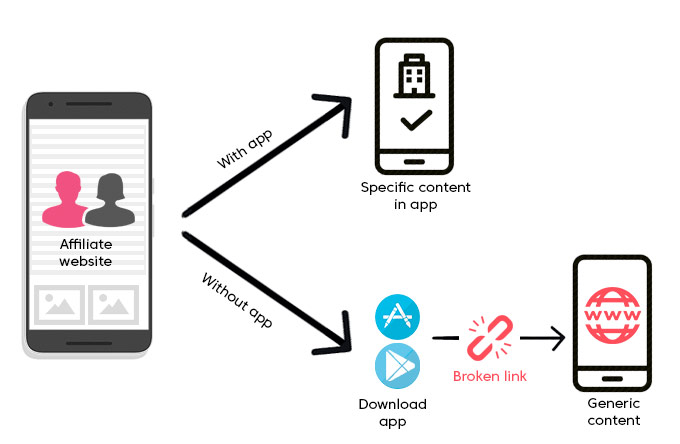
Вы надеетесь, что клиент перейдет по ссылке и попадет на нужную страницу в приложении инстаграм. На самом деле его перекидывает в браузер, предлагает залогиниться в веб-версии Инстаграма*. И дальше почти никто не идет. А это около 90% всех переходов по вашему объявлению.
Все спрашивают, что же это – диплинк?
В оригинале это Deep Linking – технология перемещения между приложениями. Причем попадают пользователи в заранее оговоренные разделы. Фактически это «правильная» ссылка, и она вместо браузера уведет человека на нужную вам страницу приложения. Чего вы и добивались.
В каких случаях их можно и нужно использовать?
Диплинки задействуют, к примеру если нужно направить поток пользователей на определенный профиль в инстаграм. Иногда – в период тестирования рекламной кампании. Это позволит выполнить сплит-тесты, сделать корректные тесты на различные сегменты потребителей, потестить заголовки. Когда оптимальный вариант рекламного объявления найден, его запускают уже с нормальным бюджетом.
Отличия в настройках
Учтите, что есть серьезные различия в открытии диплинков на андроиде и iOS.
В устройстве на андроиде пользователя сразу перебрасывает в приложение. А вот в iOS сначала открывается окно с вопросом: переходить в приложение инстаграм* или нет? При этом пользователь должен дать положительный ответ не позже 30 сек. Иначе начинает грузиться страница профиля в браузере.
Как создавать диплинки?
Эту технологию мы реализовали в новом сервисе. Мобзио - конструктор диплинков и мультиссылок.
Мы не ограничиваем ваш диплинк по трафику, можете прикрепить собственный домен, подключить счетчики статистики от яндекс.метрики и гугл анатилитики.
Попробуйте уже сейчас и бесплатно.
Этапы настройки
- Зайдите в свой инстаграм* (в его веб-версию) на страничку профиля.
- Скопируйте URL страницы, он сохранится в буфере обмена.
- Войдите в мобзио.
- Вставьте скопированную ссылку.
- Вы получите ссылку, скопируйте ее.
- Войдите в свой рекламный кабинет на фейсбуке.
- В процессе создания рекламы вписывайте в соответствующее поле выданную сервисом ссылку для формирования объявлений.
- Запустите рекламу.
Все, при соблюдении этой последовательности действий ваши клиенты при переходе по объявлению будут попадать непосредственно в приложение инстаграм.
Вы поняли, как это работает? Пользуйтесь на здоровье!