
Содержание
- Сторис в Инстаграм: их функциональность и использование
- Что такое Сторис в Инстаграм?
- Описание функции Сторис
- Возможности использования Сторис
- Примеры популярных Сторис на Инстаграм
- Вопрос-ответ:
- Что такое Инстаграм сторис?
- Как сделать сторис в Инстаграме?
- Кто может увидеть мои сторис в Инстаграме?
- Можно ли сохранить сторисы в Инстаграме?
- Какие еще функции есть в Инстаграм сторис?
- Что такое Сторис в Инстаграм?
- Как использовать Сторис в Инстаграм?
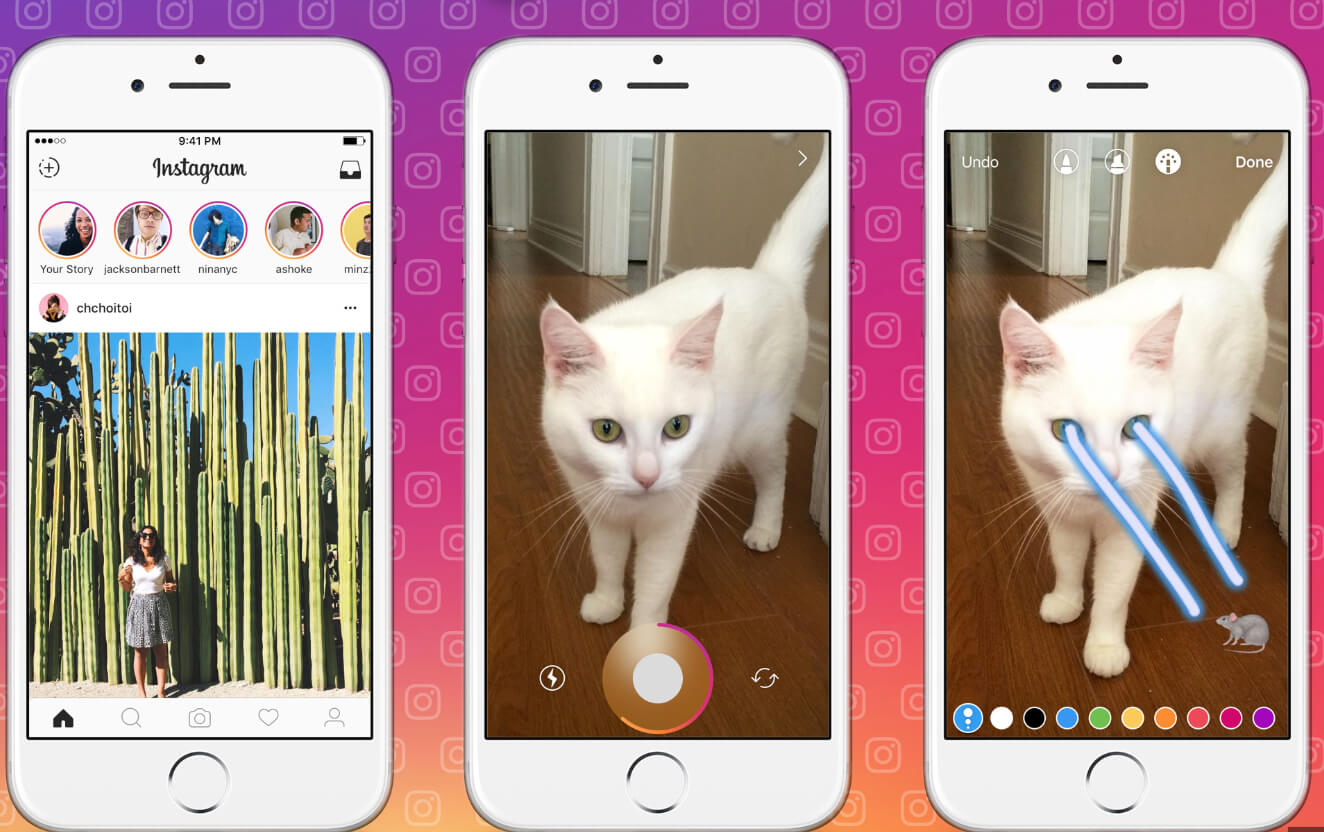
В социальной сети Instagram каждый день появляется множество новых функций, среди которых особую популярность приобрела функция «Сторис». Что это такое и как им пользоваться? В этой статье мы расскажем все, что вам нужно знать о сторис в Instagram.
Сторис – это короткие видео или фотографии, которые пользователи могут опубликовать в своем профиле Instagram в течение 24 часов. Они отображаются в виде отдельных историй вверху экрана и могут быть просмотрены вашими подписчиками. Привлекательность сторис заключается в их временном характере: они исчезают через сутки, что делает их более живыми и легкими в потреблении контента.
Сторис дают возможность создавать интерактивный и непринужденный контент. Вы можете поделиться моментами из своей жизни, повседневными событиями, праздниками, путешествиями или делать мини-обучающие лекции. Кроме того, вы можете добавлять к сторис разнообразные фильтры, стикеры, тексты, рисунки, а также использовать функцию «Оживить», чтобы сделать свои сторис еще более интересными.
Как использовать сторис в Instagram? Очень просто! Чтобы создать свой сторис, вам нужно открыть приложение Instagram и нажать на значок камеры в левом верхнем углу экрана. Затем вы сможете сделать фото или записать видео прямо в приложении или выбрать уже готовый контент из галереи вашего устройства. После этого вы можете добавить фильтры, стикеры, тексты или другие эффекты, а затем опубликовать свой сторис, нажав на кнопку «Опубликовать» в правом нижнем углу.
Сторис в Инстаграм: их функциональность и использование
Функциональность сторис предоставляет пользователям широкие возможности для создания креативного контента и взаимодействия со своей аудиторией. С помощью него можно добавлять на фото и видео различные фильтры, локации, хэштеги, стикеры, а также писать тексты и рисовать прямо на изображениях. Благодаря этим инструментам, сторис можно использовать для создания привлекательного и оригинального контента.
Использование сторис может быть полезным для различных целей и задач. Пользователи могут использовать сторис для продвижения своих продуктов и услуг, демонстрации своей активности или интересов, общения с подписчиками, публикации рекламных акций, проведения опросов и голосований, а также для создания ознакомительных видеоуроков и многое другое. Сторис позволяют пользователям стать ближе к своей аудитории и устанавливать более глубокую связь с подписчиками.
Кроме того, сторис могут быть использованы и как дополнительный источник дохода. Некоторые пользователи активно сотрудничают со спонсорами и рекламодателями, позволяющими им зарабатывать на размещении рекламных материалов в своих сторис.
В целом, сторис в Инстаграм – это удобное и интересное средство для общения с аудиторией и создания контента, который будет интересен и привлекателен для подписчиков. Это функция, которую стоит использовать, чтобы быть ближе к своей аудитории и делиться с ней своими моментами и идеями.
Что такое Сторис в Инстаграм?
Основная идея Сторис в Инстаграмe заключается в возможности публикации краткосрочного и более спонтанного контента, который может быть более личным и нетривиальным, чем посты в ленте. Каждый пользователь Инстаграма может добавлять фотографии, видео, текст, стикеры, музыку и другие эффекты к своим Сторис.
Сторисы отображаются вверху ленты новостей пользователя, отдельно от основной ленты, и могут быть просмотрены только в течение 24 часов с момента публикации. Пользователи могут пролистывать Сторисы своих подписчиков, отвечать на них, а также напрямую общаться с владельцами аккаунтов.
Сторис в Инстаграме предоставляют отличную возможность для пользователей показать свою творческую жилку, делиться моментами из своей повседневной жизни, а также продвигать свой бренд или продукты.
Описание функции Сторис

В отличие от обычных постов, которые остаются в профиле навсегда, Сторис помогает выразить более непосредственный и актуальный контент. Пользователи могут делиться в Сторис своими повседневными моментами, задавать вопросы, использовать фильтры и эмодзи, добавлять текст и рисунки, оформлять свою историю различными способами.
Когда пользователь публикует Сторис, она становится доступной для его подписчиков в виде круглой аватарки в верхней части ленты новостей. Подписчики могут просмотреть Сторис, прокручивая ее горизонтально. Все опубликованные Сторис могут быть видны в профиле пользователя в виде узкой полоски в верхней части экрана.
Функция Сторис позволяет пользователям создавать более личные и временные контенты, которые могут привлечь больше внимания подписчиков. Она также открывает возможности для более интерактивной коммуникации с аудиторией путем использования встроенных функций, таких как голосования, гифки, местоположения и другие.
Сторис – это отличный способ продвижения и укрепления личного бренда, взаимодействия с аудиторией, повышения общего уровня вовлеченности следователей и создания уникального контента, который исчезнет через 24 часа.
Возможности использования Сторис
Сторис являются мощным инструментом для взаимодействия с аудиторией и создания уникального контента. Вот несколько способов, как можно использовать Сторис в Инстаграме:
- Рассказывайте истории — Сторис позволяют вам поделиться своими историями, дополненными фотографиями, видео и текстом. Это отличный способ привлечь внимание пользователей и поделиться своим опытом, мыслями или чем-то интересным из вашей жизни.
- Проводите опросы — Создавайте опросы в Сторис, чтобы узнать мнение своей аудитории или получить обратную связь.
- Публикуйте акции и скидки — Сторис — это отличное место, чтобы оповестить своих подписчиков о текущих акциях, скидках или специальных предложениях.
- Показывайте «за кулисами» — Сторис позволяют вам показать подписчикам, что происходит «за кулисами» вашего бренда или компании.
- Используйте стикеры и фильтры — В Сторис есть множество интересных стикеров и фильтров для создания уникального контента.
- Создавайте «загадки» и игры — Сторис можно использовать для создания загадок, игр и викторин с вашей аудиторией.
Возможности использования Сторис в Инстаграме почти бесконечны, и они зависят только от вашей фантазии и целей. Однако, помните, что контент должен быть интригующим, интересным и полезным для вашей аудитории.
Примеры популярных Сторис на Инстаграм
2. Задание вопросов и ответы: В Сторис можно создать опрос или задать вопрос своим подписчикам. Это отличный способ узнать мнение и предпочтения своей аудитории.
3. За кадром съемок: Если вы фотограф, дизайнер или работаете в креативной сфере, вы можете показать подписчикам, как создается ваше творчество.
4. Путешествия и приключения: Сторис — отличная возможность поделиться своими путешествиями и необычными местами.
5. Раздачи и конкурсы: Сторис отлично подходят для объявления об акциях, показа призов и объявления победителей.
6. День из жизни: Покажите подписчикам, как вы проводите свой обычный день.
7. Рецепты и еда: Делитесь рецептами и вкусными фотографиями в Сторис.
8. Бэкстейдж событий: Снимайте Сторис на мероприятиях, выставках, концертах.
9. Обучение и советы: Делитесь советами и учебными материалами в видеоформате в Сторис.
10. Интервью и сотрудничество: В Сторис можно проводить интервью или делать совместные проекты с другими блогерами или брендами.
Не забудьте опубликовать истории в формате Сторис на вашем профиле Инстаграма, чтобы ваша аудитория могла насладиться вашим творчеством и узнать вас лучше.
Вопрос-ответ:
Что такое Инстаграм сторис?
Инстаграм сторис — это функция в приложении Instagram, которая позволяет пользователям делиться фото и видео контентом, который исчезает через 24 часа. Они отображаются в вертикальном формате в верхней части ленты новостей и могут содержать текст, стикеры, фильтры и другие интерактивные элементы.
Как сделать сторис в Инстаграме?
Откройте приложение Instagram, нажмите на область сторис вверху или на значок камеры в левом верхнем углу. Сделайте фото или видео, добавьте текст, стикеры, фильтры и опубликуйте в своей истории.
Кто может увидеть мои сторис в Инстаграме?
По умолчанию ваши сторис видят только ваши подписчики. Вы можете настроить приватность и выбрать «близкие друзья» или конкретных людей.
Можно ли сохранить сторисы в Инстаграме?
Сторисы по умолчанию исчезают через 24 часа. Вы можете сохранить их на устройство, нажав «Сохранить» перед публикацией — они попадут в галерею.
Какие еще функции есть в Инстаграм сторис?
В сторис можно добавлять текст, стикеры, фильтры, эмодзи, создавать опросы и голосования, задавать вопросы, добавлять локации, хештеги и отмечать других пользователей.
Что такое Сторис в Инстаграм?
Сторис в Инстаграм — это возможность публиковать фото и видео, которые исчезают через 24 часа. Функция появилась в 2016 году и стала очень популярной.
Как использовать Сторис в Инстаграм?
Откройте приложение и нажмите на иконку камеры в верхнем левом углу. Сделайте фото или видео, примените фильтры и эффекты, добавьте текст и стикеры, затем опубликуйте — Сторис будет виден подписчикам 24 часа.
